Identity Document Services: The Complete Guide to Digital Identity on iOS 26

Digital identity represents one of the most significant technological evolutions of this decade. With iOS 26, Apple takes a major step by introducing the Identity Document Services framework, allowing developers to integrate identity verification directly into their applications. This advancement is part of a global movement toward digitizing identity documents, driven by regulations like eIDAS 2.0 in Europe and the progressive deployment of mobile driver's licenses (mDL) worldwide.
This article is intended for iOS developers looking to implement these features, but also for business and product teams who need to understand the opportunities offered by this new era of digital identity. We will cover the entire ecosystem: from the regulatory context to production-ready Swift 6.2 code examples, including technical standards and security best practices.
“This article was written and tested with Xcode 26, Swift 6.2 and iOS 26.2 on iPhone 15 Pro. The code examples are functional and compilable in this environment.”
The Era of Digital Identity
An Inevitable Transformation
Traditional identity verification suffers from fundamental limitations. Photographing a physical document to upload it to a website exposes the user to fraud risks, generates a poor user experience, and requires companies to develop complex document validation solutions. Mobile documents (mDocs) address these issues by offering a secure, standardized, and privacy-respecting alternative.
Apple presented a major overhaul of its digital identity approach at WWDC 2025. The IdentityDocumentServices framework now allows iOS applications to participate in online identity verification flows, while support for the W3C Digital Credentials API in Safari and WebKit extends these capabilities to the web. This dual approach — native and web — positions the Apple ecosystem as a key player in digital identity.
What Identity Document Services Enables
The IdentityDocumentServices framework offers several fundamental capabilities. For applications wishing to provide identity documents, it allows registering mDocs with the iOS system and presenting them during online verification flows. For websites wishing to verify identities, Safari's Digital Credentials API allows requesting and receiving identity information in a standardized manner.
The main advantages include selective disclosure (sharing only necessary information), cryptographic security (digital signatures by the issuing authority), cross-platform interoperability (open ISO and W3C standards), and an optimal user experience (no document photos, biometric authentication).
Regulatory Context
eIDAS 2.0 and the European Digital Identity Wallet
The European regulation eIDAS 2.0 (Regulation EU 2024/1183), which came into force on May 20, 2024, constitutes the legal framework for digital identity in Europe. It requires each Member State to provide a European Digital Identity Wallet (EUDI Wallet) to its citizens by the end of 2026.
The key milestones in the eIDAS 2.0 calendar are as follows:
- May 2024: Entry into force of the regulation
- November 2024: Adoption of implementing acts defining technical specifications
- End of 2026: Mandatory provision of at least one national wallet per Member State
- End of 2027: Mandatory acceptance by regulated sectors (banks, telecoms, healthcare)
- 2030: Target of 80% adoption by European citizens
The regulation imposes the principle of privacy by design: the user decides what data to share and maintains a history of their shares. Selective disclosure thus becomes a legal requirement, not just a technical feature.
The Situation in France: France Identité and ANTS
France has deployed the France Identité application which already allows storing one's digital ID card and driver's license. The National Agency for Secure Documents (ANTS) leads the POTENTIAL consortium, bringing together 148 participants from 19 Member States, to test the deployment of the European wallet.
The French digital driver's license can be presented during traffic checks and will soon be usable for vehicle rentals and online procedures. This initiative foreshadows full integration with the mDL standard and eIDAS 2.0 requirements.
International Deployment
In the United States, Apple Wallet already supports digital driver's licenses (mDL) in several states, accepted at more than 250 TSA checkpoints. The list of compatible states is progressively expanding: Arizona, California, Colorado, Georgia, Hawaii, Illinois, Iowa, Maryland, Montana, New Mexico, North Dakota, Ohio, West Virginia...
iOS 26 also introduces the ability to create a digital passport by scanning one's physical passport and verifying identity through biometrics. This digital passport can be used for domestic flights in the United States via TSA checkpoints.
The ISO 18013-5 Standard
mDL Architecture
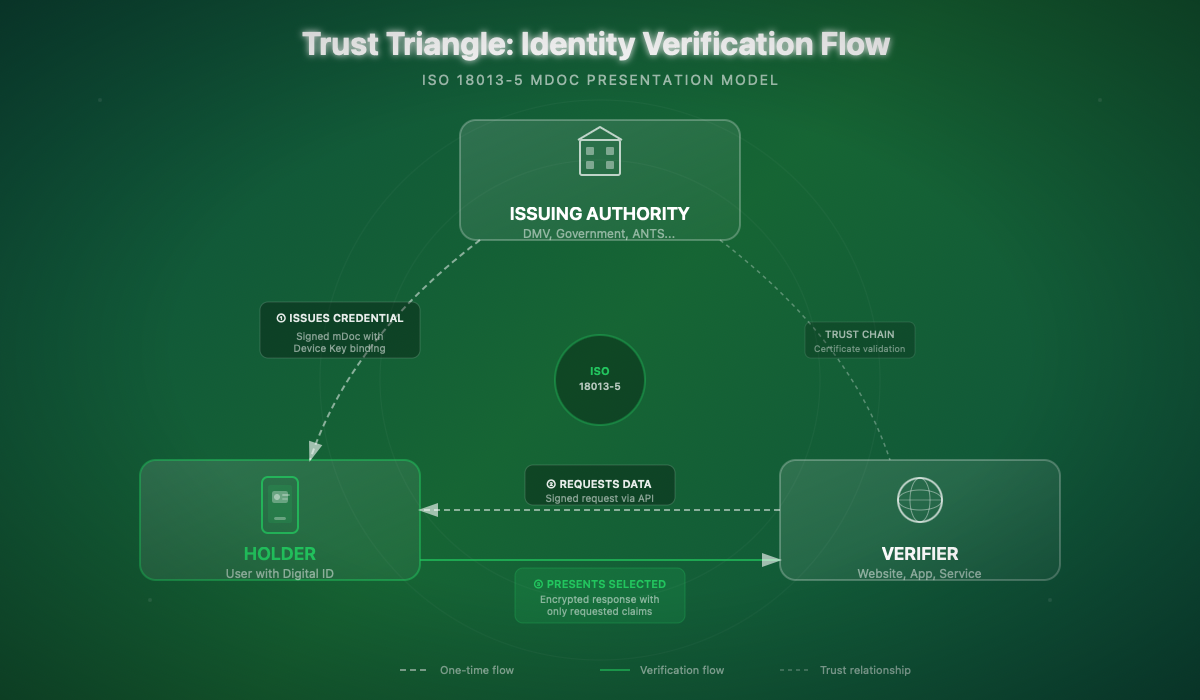
The ISO 18013-5 standard defines the architecture of mobile driver's licenses (mDL). An mDoc is structured around several essential components.
The Mobile Security Object (MSO) is an immutable object signed by the issuer containing the document's security metadata. It includes the digests (cryptographic fingerprints) of each data element, allowing verification of the authenticity and integrity of shared information.
Namespaces organize the document's data. For a driver's license, the main namespace is org.iso.18013.5.1 and contains standardized elements such as given_name, family_name, birth_date, portrait, driving_privileges, etc.
The Device Key is a unique cryptographic key tied to the device on which the document was provisioned. It proves that the presented document comes from the authorized device, preventing copying to other devices.
Presentation Protocols
ISO 18013-5 defines two presentation modes:
- Device Retrieval: the verifier communicates directly with the user's device (NFC, BLE, QR code)
- Reader Retrieval: used for online verifications where the browser or application acts as an intermediary
ISO 18013-7 complements these specifications with web support via Annex C, which defines the request and response format for the Digital Credentials API.
Integrated Security
mDoc security relies on several mechanisms. Issuer authentication ensures that data comes from a legitimate authority via a verifiable certificate chain. Document authentication proves that the mDoc has not been copied to another device thanks to the Device Key. End-to-end encryption protects exchanged data against interception, even by the browser or operating system.
CBOR Format — mDocs use the CBOR (Concise Binary Object Representation) format for data encoding. For a thorough understanding of CBOR and its use in Swift, see our article CBOR and ASN.1: Complete Guide for Swift.
Identity Document Services — Overview
Framework Presentation
The IdentityDocumentServices framework is the heart of the iOS implementation for digital identity. It allows applications to register as identity document providers and participate in online verification flows.
A companion framework, IdentityDocumentServicesUI, provides the user interface components necessary to display consent and authorization screens.
Availability and Prerequisites
| Criteria | Requirement |
|---|---|
Minimum iOS | iOS 26.0 |
Devices | iPhone with Secure Enclave |
Regions | Progressive availability by issuer |
Entitlements | Specific Apple entitlement required |
Certification | Production: Apple Business Connect entitlement |
For development and testing, Apple provides a sandbox environment allowing work with test credentials. Production deployment requires an entitlement request through Apple Business Connect and compliance with conformity requirements.
High-Level Architecture
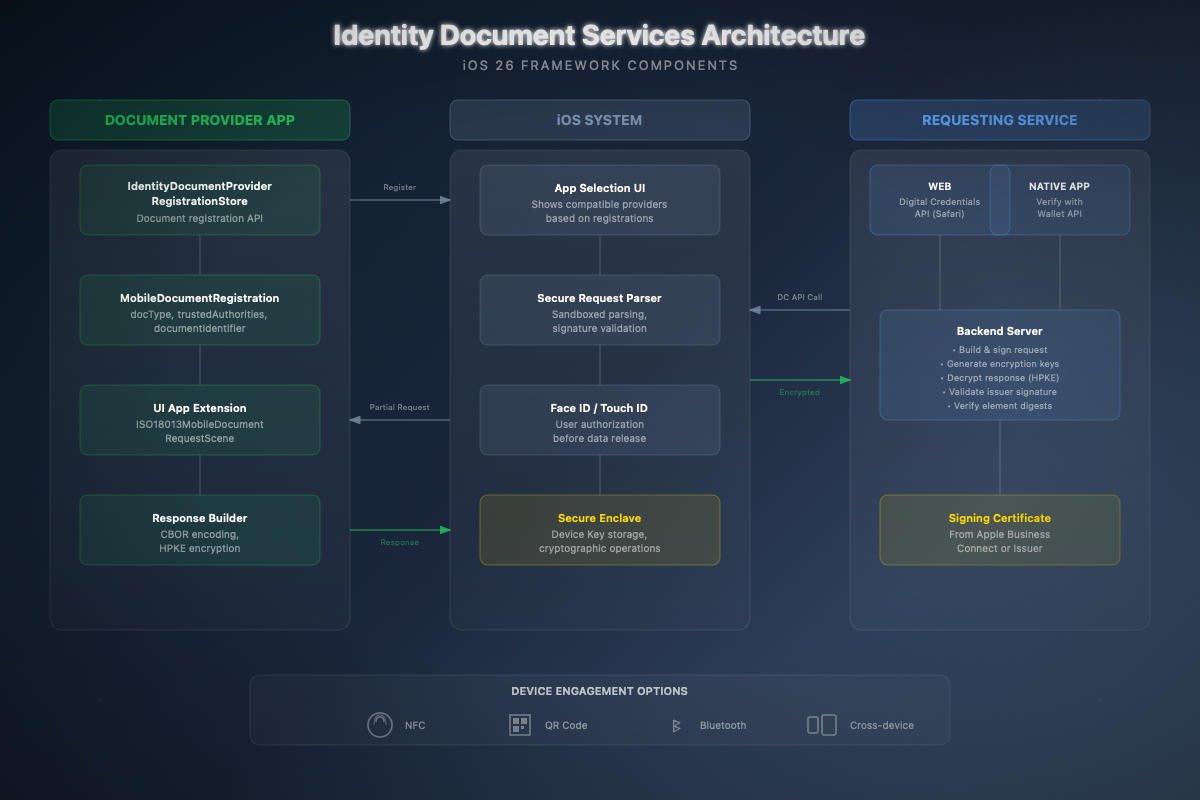
The architecture consists of three main actors:
- Document Provider App: the application that stores and manages identity documents (Apple Wallet or third-party application)
- iOS System: orchestrates flows, displays selection UI, manages biometric authentication
- Requesting Service: the website or application requesting identity verification
The typical flow proceeds as follows:
- The user visits a website and initiates identity verification
- The site calls the Digital Credentials API with a signed request
- iOS displays a selection UI of applications providing compatible documents
- The user selects an application and authorizes sharing via Face ID/Touch ID
- The provider application encrypts and returns the requested data
- The site decrypts and validates the response server-side
Configuration and Setup
Capabilities and Entitlements
To develop a Document Provider application, you must configure the appropriate capabilities in Xcode. Add the com.apple.developer.identity-document-services.document-provider.mobile-document-types entitlement in your entitlements file:
Info.plist Configuration
Your application must declare its document provision capabilities in Info.plist. This allows iOS to know what types of documents your application can provide:
Creating the App Extension
Integration with the identity verification system is done via a UI App Extension. In Xcode 26, create a new target by selecting the "Identity Document Provider" template:
- File → New → Target
- Select "Identity Document Provider Extension"
- Name the extension (e.g.,
IdentityProviderExtension)
- Name the extension (e.g.,
- Xcode automatically generates the basic structure
Document Provider Implementation
Document Registration
Registering a document with iOS is the first step. This operation must be performed when your application provisions a new mDoc for the user:
Example usage when provisioning a new license:
UI Extension Implementation
The UI extension is responsible for displaying the authorization screen when the user selects your application. Here's a complete implementation:
Complementary Views for the Extension
Extension Entry Point
Web Integration with Digital Credentials API
Overview for Web Developers
If you're developing a website that wants to verify identities, you'll use the W3C Digital Credentials API. While server implementation is outside the scope of this iOS article, here are the key concepts to understand the ecosystem.
The request consists of two main parts: the Device Request (containing the requested documents and elements) and the Encryption Information (parameters for response encryption). The whole must be signed with a certificate obtained through Apple Business Connect.
Complete Verification Flow
From the iOS perspective, here's what happens when a user initiates a verification:
- Request reception: Safari/WebKit intercepts the Digital Credentials API call
- Secure parsing: iOS parses the request in a secure sandbox and validates signatures
- Selection display: The user sees compatible applications with the request
- Selection and authorization: The user chooses an application and authorizes via Face ID
- Extension processing: Your extension receives the partial then complete request
- Encrypted response: Your extension builds and encrypts the response
- Return to site: The response is transmitted to the site for server-side decryption
Security and Privacy
Privacy by Design
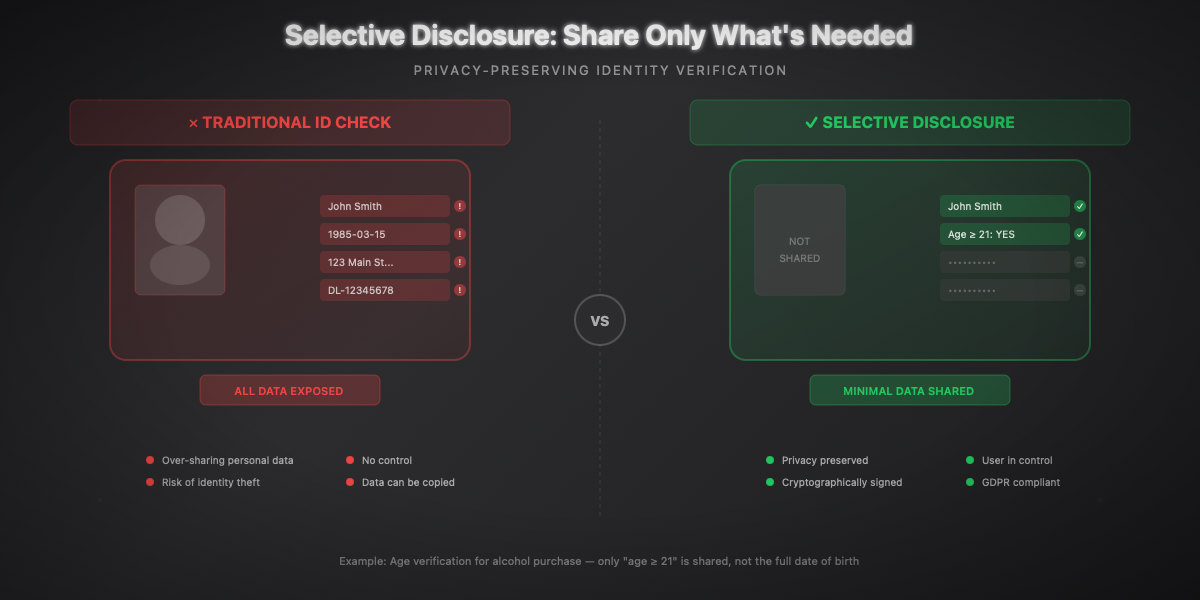
Identity Document Services architecture is designed around the principle of data minimization. The user sees exactly what information is requested before giving consent. Selective disclosure allows sharing only necessary attributes: for example, proving one is over 21 without revealing their exact date of birth.
Security Mechanisms
Several security layers protect exchanges:
Request authentication: The requesting site signs its request with a verified certificate. The user can thus know who is requesting their information.
End-to-end encryption: The response is encrypted with HPKE (Hybrid Public Key Encryption, RFC 9180) using a key generated by the requestor's server. Neither the browser nor iOS can read the data.
Issuer authentication: The Mobile Security Object contains a signature from the issuing authority (state, prefecture...), allowing verification of data authenticity.
Document authentication: The Device Key proves the mDoc comes from the authorized device, preventing copying to other devices.
Phishing Protection
The API allows Document Provider applications to perform domain validation on the requesting site. If a malicious site attempts to impersonate a legitimate site, this validation will fail and the user won't be able to share their data.
GDPR Compliance
The API naturally aligns with GDPR requirements:
- Data minimization: only necessary data is shared
- Explicit consent: user authorizes each share via Face ID
- Transparency: user sees who requests what data
- Right to be forgotten: no data is stored by the iOS system
GDPR Compliance — For an in-depth analysis of GDPR compliance in Apple applications, see our article GDPR and Privacy: Complete Guide for Apple Developers.
Concrete Use Cases
Vehicle Rental
Vehicle rental is the ideal use case for Identity Document Services. The optimized user journey proceeds as follows:
- The user selects their vehicle on the rental app
- At the time of identity verification, the app calls the API
- The user sees a request for: name, first name, photo, license categories
- They authorize with Face ID
- The rental is confirmed in seconds
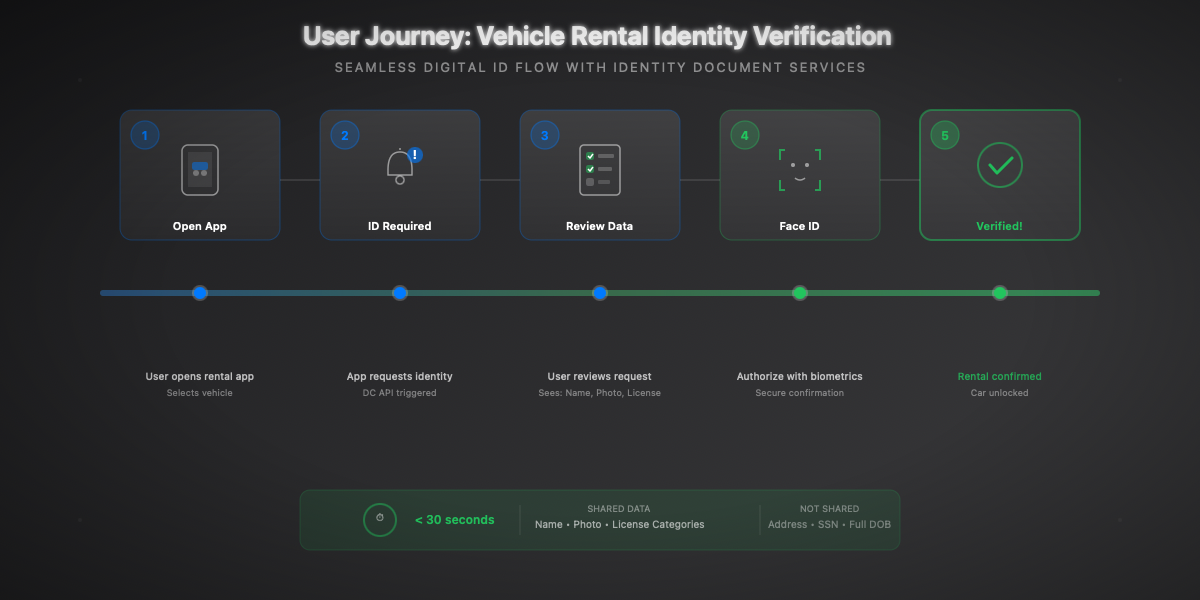
The advantages are considerable: no more license scanning, no more manual verification by an agent, reduced document fraud, and a smooth user experience.
Age Verification
For online merchants selling age-restricted products, verification can be limited to a simple boolean:
Hospitality and Check-in
For hotel check-in, Identity Document Services can replace the traditional passport copy:
Finance and KYC
For financial services, Identity Document Services significantly simplifies the KYC (Know Your Customer) process:
Advanced Technical Integration
Combination with CryptoKit
For applications requiring advanced cryptographic operations, CryptoKit can complement Identity Document Services:
CryptoKit in Detail — For a complete exploration of CryptoKit and its cryptographic capabilities, see our article CryptoKit: Fundamentals Guide for Swift.
Secure Logging
For audit and compliance needs, a secure logging system is essential:
Testing and Mocking
To test your integrations, create mocks of the framework types:
Best Practices
User Experience
UX is crucial for adoption of digital identity verification. Here are the principles to follow:
Request the minimum necessary: If you only need to verify age, don't request the address. Selective disclosure exists for a good reason.
Explain why: Before initiating verification, clearly explain why you need this information and how it will be used.
Handle rejections gracefully: If the user declines verification, offer alternatives (manual verification, other method) rather than blocking the flow.
Respect errors: If verification fails (expired document, invalid signature), clearly communicate the problem and possible solutions.
Error Handling
Fallback for Users Without Digital Documents
Not all your users will have a digital identity document. Always plan for an alternative:
Accessibility
Don't forget accessibility in your verification interfaces:
Further Reading
Official Resources
Standards and Regulations
Related Articles
- CBOR and ASN.1: Complete Guide for Swift — Understanding mDoc encoding format
- CryptoKit: Fundamentals Guide — Mastering cryptographic operations
- GDPR and Privacy: Guide for Apple Developers — Ensuring application compliance
France Resources
- France Identité — Official French digital identity application
Conclusion
Digital identity represents a paradigm shift in our relationship with official documents. With Identity Document Services, Apple provides iOS developers with the tools needed to build secure identity verification experiences that respect privacy and comply with international regulations. Adoption of these standards will open new business opportunities while strengthening user trust in digital services.