Core ML: The Complete Guide to On-Device Machine Learning

Master Core ML from A to Z: architecture, Create ML, PyTorch/TensorFlow model conversion, Vision and Natural Language integration, performance optimization, and advanced use cases for iOS 26.
Test Environment
This article was written and validated with the following environment:
- Xcode 26
- Swift 6.2
- iOS 26.2 on iPhone 15 Pro
- macOS Tahoe 26 on MacBook Pro M4 Max
Introduction to On-Device Machine Learning
On-device Machine Learning represents a revolution in how we design mobile applications. Rather than sending data to remote servers for processing, models run directly on the user's device.
Why On-Device ML?
Four major advantages justify this approach:
Privacy by Design: Data never leaves the device. For applications handling sensitive information (health, finance, biometric data), this is a decisive argument. No data transits through third-party servers, eliminating leak risks.
Minimal Latency: Without network round-trips, inference runs in milliseconds. For real-time applications like object detection in augmented reality or voice analysis, this responsiveness is crucial.
Offline Operation: The application remains fully functional without internet connection. Whether the user is on a plane, in a tunnel, or in a dead zone, ML continues to work.
Cost Reduction: No inference servers to maintain, no bandwidth to pay for. The marginal cost per user becomes nearly zero once the application is deployed.
The Apple Silicon Advantage
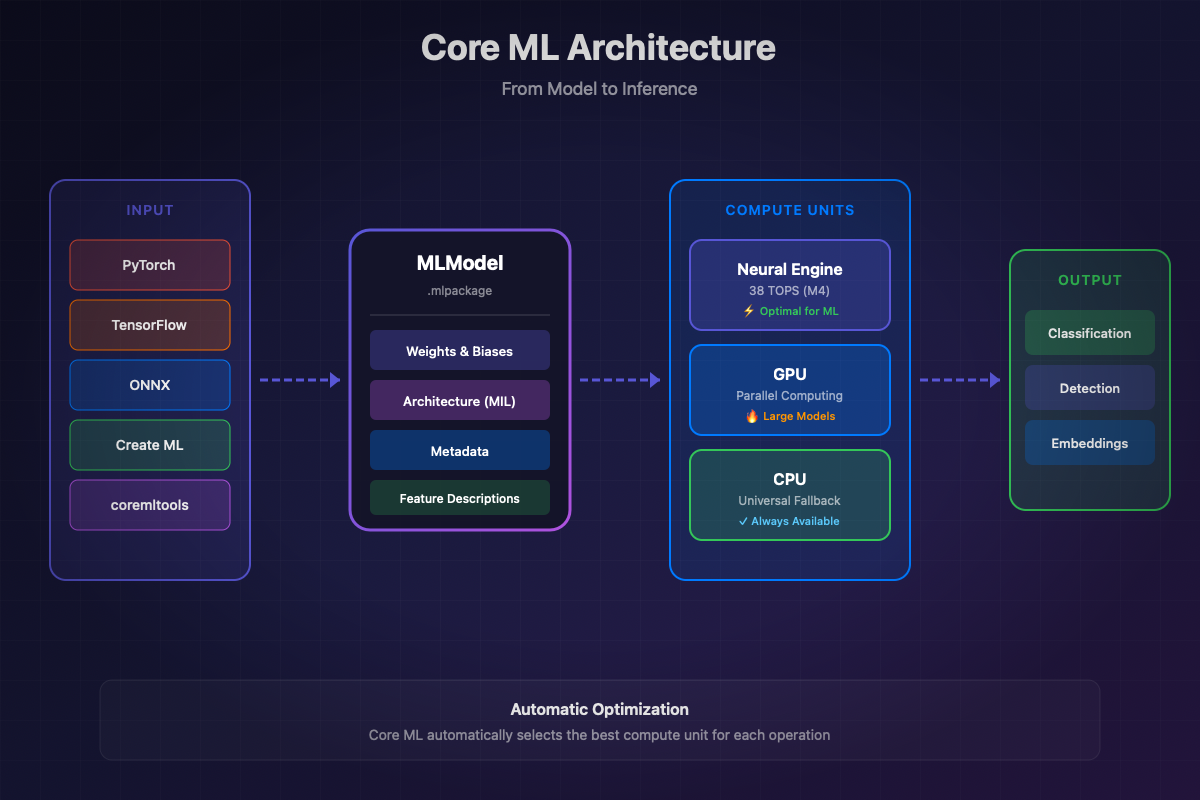
Apple designed its hardware for on-device ML. Each modern device has three optimized compute units:
The Neural Engine (ANE) is the key component. On M4 chips, it reaches 38 TOPS (trillion operations per second). For optimized models, the ANE offers the best performance/power consumption ratio.
The GPU excels at massive matrix operations and very large models. It remains relevant for LLMs and diffusion models like Stable Diffusion.
The CPU serves as a universal fallback and efficiently handles small models or operations not supported by the ANE.
Apple Ecosystem: CoreML vs Foundation Models vs Create ML
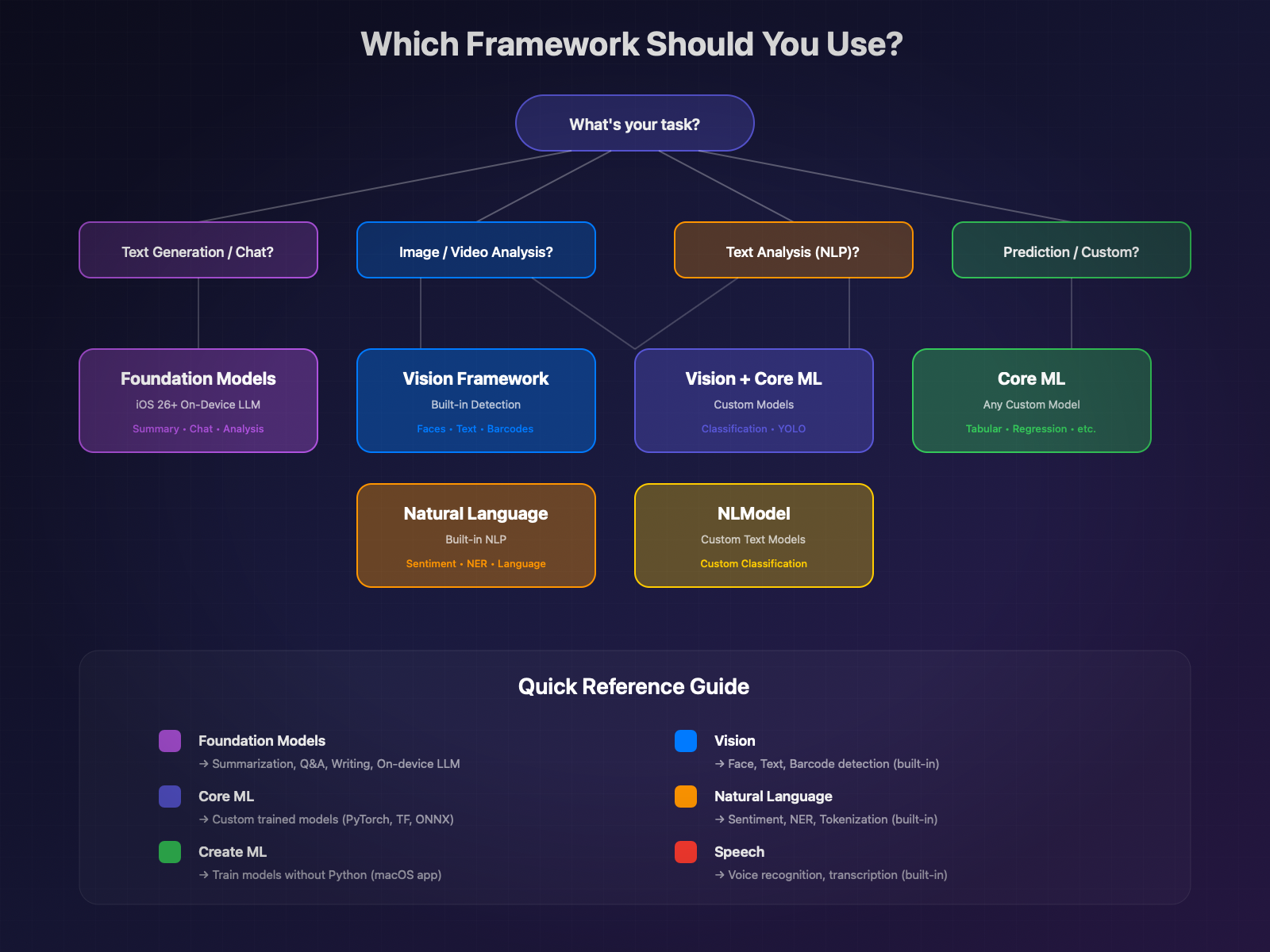
Apple offers several complementary frameworks. Here's how to choose:
| Framework | Primary Use | When to Use |
|---|---|---|
Core ML | ML model execution | Custom models, vision, sound, prediction |
Foundation Models | Apple's on-device LLM | Text generation, summarization, semantic analysis |
Create ML | Model training | Creating classifiers, detectors without Python code |
Vision | Image analysis | Face detection, text, objects, poses |
Natural Language | Text analysis | Sentiment, entities, text classification |
Speech | Voice recognition | Transcription, voice commands |
Decision Tree: Which Framework to Choose?
Core ML Architecture
Core ML is Apple's unified inference engine. It abstracts hardware complexity and automatically optimizes model execution.
Core ML Model Structure
A Core ML model exists in two formats:
.mlmodel: Legacy format, runtime compilation. Still supported but deprecated for new projects.
.mlpackage: Modern format (iOS 15+). Package containing the optimized model, metadata, and assets. Early compilation possible.
MLModel: The Heart of the Framework
MLModel encapsulates all model information and functionality:
MLFeatureProvider: Managing Inputs/Outputs
Data flows through the MLFeatureProvider protocol. You can use standard implementations or create your own:
MLPredictionOptions: Fine Control of Inference
Compute Units and Deployment Strategies
The choice of compute units directly impacts performance:
iOS 26 Core ML Enhancements
iOS 26 brings several significant improvements:
MLTensor: New type to simplify "stitching" code between models. No more manual MLMultiArray manipulation.
Stateful Models: Improved support for models with internal state (KV-cache for LLMs).
Performance optimizations: Automatic improvements on iOS 26, without code changes.
Create ML: Training Without Python Code
Create ML is Apple's tool for creating Core ML models without writing Python code. Available as a macOS application and as a Swift framework.
Create ML App: The Graphical Interface
The Create ML application (included with Xcode) allows visual training:
- Open Create ML from Xcode → Open Developer Tool → Create ML
- Create a new project according to the task type
- Import your training data
- Train and evaluate the model
- Export to
.mlmodelor.mlpackageformat
- Export to
Supported Task Types
Create ML covers a wide spectrum of ML tasks:
| Task | Description | Required Data |
|---|---|---|
Image Classification | Categorize images | Image folders by class |
Object Detection | Detect and locate objects | Images + JSON annotations |
Style Transfer | Apply artistic style | Style image + content images |
Text Classification | Categorize text | CSV/JSON file text + label |
Word Tagging | Annotate words | Text + per-word annotations |
Tabular Classification | Classify tabular data | CSV with features + label |
Tabular Regression | Predict numeric value | CSV with features + target |
Recommendation | Suggest items | User-item interactions |
Sound Classification | Classify sounds | Audio files by class |
Activity Classification | Classify movements | Sensor data + labels |
Programmatic Training with CreateML Framework
For more control, use the CreateML framework:
Text Classification
Object Detection
Training Tips for M4 Max
Apple Silicon M4 Max is ideal for local training:
- Unified Memory: The 128 GB of RAM shared between CPU and GPU allows training large models without paging.
- Neural Engine: Used for inference during validation, accelerating the feedback loop.
- Thermal optimization: For long training sessions, monitor temperature with:
- Batch size: On M4 Max with 128 GB, you can increase batch size to speed up training:
Importing External Models
Most ML models are trained in Python with PyTorch or TensorFlow. Core ML Tools allows converting them to Core ML format.
Installing coremltools
Converting from PyTorch
PyTorch is the most widely used framework. Conversion is done in two steps: model tracing then conversion.
Converting from TensorFlow/Keras
“Compatibility Note: coremltools 9.0 is officially tested with TensorFlow 2.12. Recent versions (2.15+) have incompatibilities. Recommendation: prefer PyTorch or go through ONNX for recent TensorFlow models.”
Alternative via ONNX (for TensorFlow 2.15+):
Converting from ONNX
ONNX (Open Neural Network Exchange) is an intermediate format supported by many frameworks.
Example with a Hugging Face Model
Let's convert a popular image classification model from Hugging Face:
Best Practices and Common Pitfalls
1. Always set the model to evaluation mode
2. Handle multiple outputs (dictionaries)
3. Watch out for unsupported operations
Some PyTorch operations don't have Core ML equivalents. Use composite ops:
4. Verify accuracy after conversion
Vision Framework + Core ML
The Vision framework simplifies using Core ML for image analysis. It automatically handles preprocessing and postprocessing.
VNImageRequestHandler and VNCoreMLRequest
Object Detection with Vision
Built-in Text Recognition (OCR)
Vision includes a powerful OCR engine without requiring an external model:
Face Detection and Landmarks
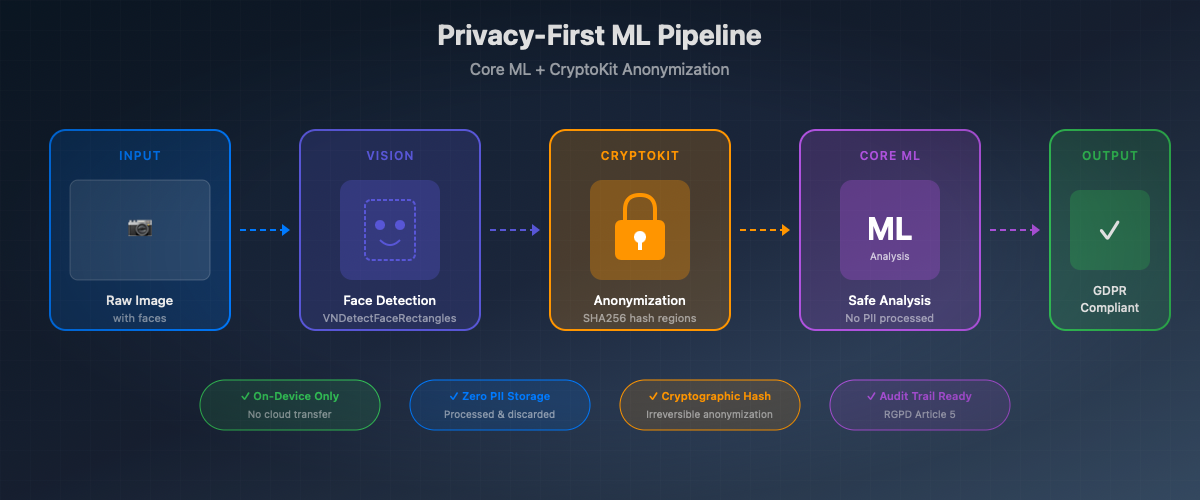
“Privacy Note: This face detection can be combined with CryptoKit to automatically anonymize sensitive areas before any ML processing. Coordinates are hashed and areas blurred, ensuring GDPR compliance.”
Natural Language + Core ML
The Natural Language framework offers advanced NLP capabilities, usable alone or with custom Core ML models.
NLModel for Text Classification
Native Sentiment Analysis
Named Entity Recognition (NER)
Tokenization and Linguistic Analysis
Speech + Core ML
The Speech framework enables on-device voice recognition, combinable with Core ML for advanced pipelines.
On-Device Voice Recognition
Combining Speech + Natural Language
A practical example: transcribe then analyze the sentiment of a voice message.
Optimization and Performance
Optimizing Core ML models is crucial for delivering a smooth user experience while preserving battery life.
Quantization: Reducing Model Size
Quantization reduces the precision of model weights, drastically reducing size and speeding up inference.
Palettization: Advanced Compression
Palettization (iOS 17+) replaces weights with indices to a color table, similar to image compression.
Pruning: Weight Trimming
Pruning zeros out insignificant weights, enabling additional compression.
Combining Techniques (iOS 18+)
iOS 18 allows combining pruning and quantization/palettization for maximum compression:
Benchmarking with Instruments
Xcode Instruments allows precise profiling of Core ML model execution.
Profiling on Device vs Simulator
The simulator does not accurately represent real performance:
Trade-off: Size vs Accuracy vs Latency
Here's a guide to choosing the right optimization strategy:
| Priority | Recommended Technique | Impact |
|---|---|---|
Minimum Size | 4-bit Quantization + 50% Pruning | -90% size, -15% accuracy |
Minimum Latency | 8-bit Quantization + Neural Engine | -5% accuracy, 2-3x faster |
Maximum Accuracy | FP16 only | -50% size, identical accuracy |
Balanced | 8-bit Quantization | -75% size, -2% accuracy |
On-Device Training
Core ML allows training and personalizing models directly on the device, without sending data to the cloud.
MLUpdateTask: Personalization Without Cloud
Example: Classifier Personalization
Limitations and Considerations
On-device training has important constraints:
1. Supported models: Only models marked as "updatable" during conversion can be trained.
2. Limited data: On-device training is designed for fine-tuning with little data (tens to hundreds of examples), not for training from scratch.
3. Battery life: Training consumes a lot of power. Prefer times when the device is charging.
4. Privacy: Data stays on the device, but the updated model can potentially encode information about the training data.
Advanced Use Cases
Healthcare: Medical Image Classification
On-device medical image analysis offers complete patient data confidentiality.
Confidential Data Anonymization
Pipeline combining Core ML (PII detection) and CryptoKit (encryption) to secure application logs.
Hybrid Pipeline: Core ML + Foundation Models
Combination of Vision (OCR) and Foundation Models (iOS 26) to analyze and summarize documents.
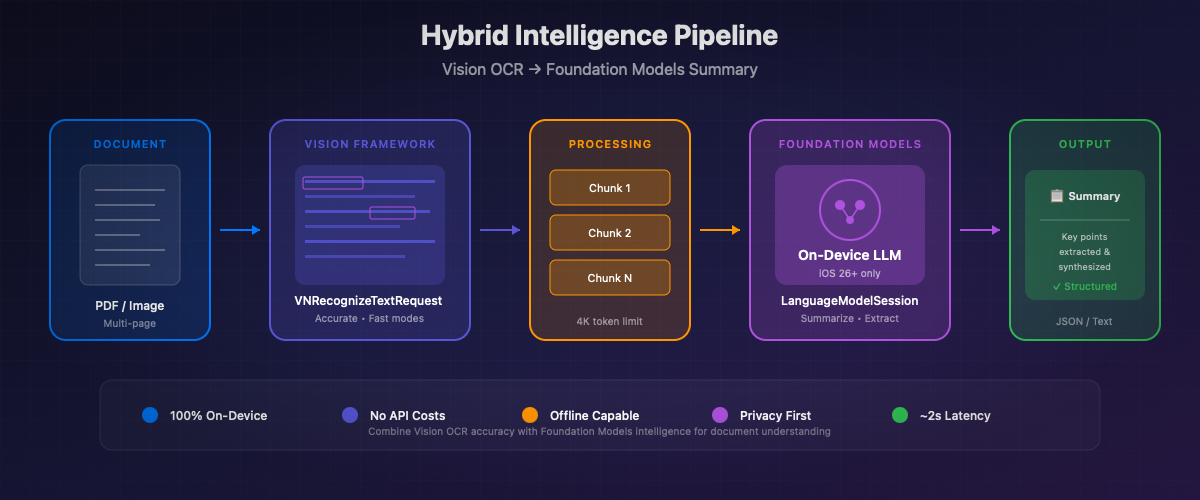
“To go further with Foundation Models: check out our dedicated article Foundation Models API: The Complete Guide to deepen your use of Apple's on-device LLMs.”
Further Reading
Official Apple Documentation
- Core ML Documentation — Complete framework reference
- Create ML Documentation — Model training guide
- Vision Framework — Image and video analysis
- Natural Language Framework — Natural language processing
- Speech Framework — Voice recognition
Conversion Resources
- coremltools Documentation — Official conversion guide
- coremltools GitHub — Source code and issues
- ML Model Gallery — Apple pre-trained models
Recommended WWDC Sessions
Hugging Face + Core ML
- swift-transformers — Swift library for transformers
- coreml-community — Core ML models on Hugging Face
- Hugging Face Blog - Mistral Core ML — On-device LLM tutorial
Related Atelier Socle Articles
- Foundation Models API: The Complete Guide — On-device LLM with iOS 26
- CryptoKit: Security and Encryption — Sensitive data encryption
- Swift 6.2: What's New — Latest language evolutions
Conclusion
Core ML is the pillar of on-device machine learning in the Apple ecosystem. With iOS 26, the possibilities expand further:
- Performance: The M4 Neural Engine and iOS 26 optimizations offer unmatched performance
- Privacy: Data stays on the device, complying with the strictest GDPR requirements
- Integration: Vision, Natural Language, and Speech integrate perfectly with your custom models
- Scalability: On-device training enables continuous personalization without cloud
Whether you're converting an existing PyTorch model or training directly with Create ML, Core ML simplifies ML deployment in your iOS applications.
The combination with Foundation Models (iOS 26) opens new perspectives for hybrid pipelines combining vision, text, and generation. The future of ML is decidedly on-device.